
Azure Firewall’s Explicit Proxy feature (preview)

Hello Guys,

Azure Firewall is a cloud-native network security service that protects your Azure resources and applications. It operates in a transparent proxy mode by default, which means that traffic is sent to the firewall using a user defined route (UDR) configuration. The firewall intercepts that traffic inline and passes it to the destination.

However, there is another mode that you can use for your outbound traffic: Explicit proxy. This mode allows you to configure a proxy setting on the sending application, such as a web browser, with Azure Firewall acting as the designated proxy. This way, traffic from the sending application goes to the firewall’s private IP address and egresses directly from the firewall without the need for a UDR.

Continue reading “Azure Firewall’s Explicit Proxy feature (preview)”
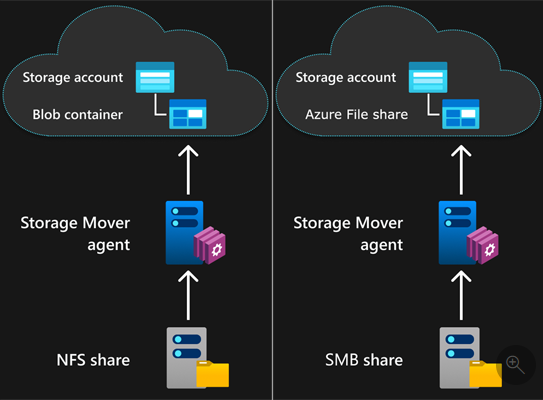
SMB shares to Azure file shares with Azure Storage Mover

Hello Guys,

If you’re seeking a seamless transition of your local files and folders to the cloud, or if you’re interested in the scalability, security, and performance benefits of Azure file shares, then the new feature of Azure Storage Mover could be just what you need. This fully managed migration service can assist you in migrating your SMB shares to Azure file shares with ease.

Azure Storage Mover is a hybrid service that consists of a cloud component and an agent component. The cloud component orchestrates the migration process and provides a user interface for creating and managing migration jobs. The agent component runs on your on-premises servers and performs the actual data transfer between your SMB shares and Azure file shares.

Continue reading “SMB shares to Azure file shares with Azure Storage Mover”

Azure Site Recovery for Shared Disks

Hello Guys,

Azure Site Recovery (ASR) is a service that helps you protect your workloads from disasters by replicating them to Azure or another region. ASR supports various types of workloads, including Windows Server Failover Clusters (WSFC) that use shared disks.

Shared disks are a feature that allows multiple VMs to access the same disk simultaneously, enabling scenarios such as SQL FCI, SAP ASCS, Scale-out File Servers, and more. However, replicating shared disks can be challenging, as they require consistency across all the VMs and disks of the cluster.

That’s why ASR has introduced a new feature in private preview: DR for Azure Shared Disks. This feature allows you to protect, monitor, and recover your WSFC-clusters as a single unit across its DR lifecycle, while also generating cluster-consistent recovery points.

In this post, we will show you how to use this feature and what benefits it offers.

Continue reading “Azure Site Recovery for Shared Disks”

Boost Your Azure Performance with Azure Boost Preview

Hello Guys,

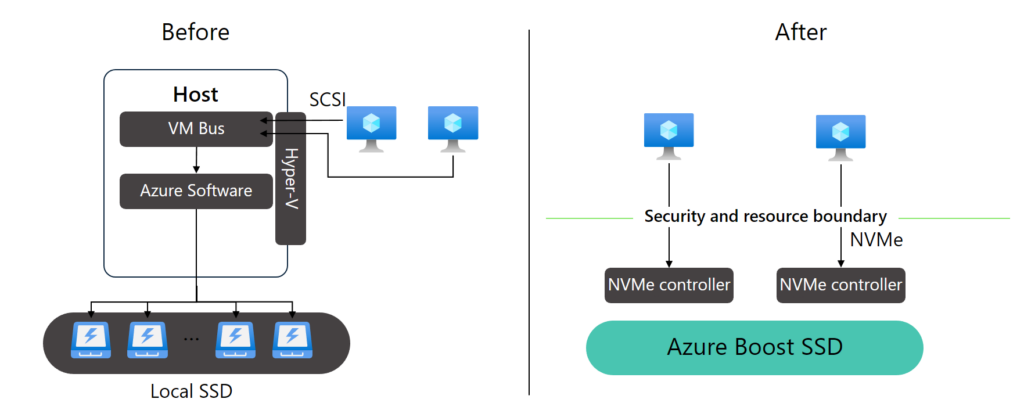
If you’re seeking to enhance your Azure network and storage capabilities, or if you’re keen on leveraging the most recent advancements in Azure infrastructure, the Azure Boost Preview could be of interest to you. This novel system transfers virtualization tasks from the hypervisor and host operating system to specialized hardware and software.

Continue reading “Boost Your Azure Performance with Azure Boost Preview”

Introducing Microsoft Entra ID: The New Name for Azure Active Directory

Hello Guys,

Microsoft has announced that Azure Active Directory (Azure AD), the cloud-based identity and access management service, is changing its name to Microsoft Entra ID. This change reflects the evolution and unification of the Microsoft Entra product family, which includes Microsoft Entra ID, Microsoft Entra Access, and Microsoft Entra Connect.

Continue reading “Introducing Microsoft Entra ID: The New Name for Azure Active Directory”

How to backup your Azure VMs using Premium SSD v2 disks

Hello Guys

When your production workloads are hosted on Azure VMs using Premium SSD v2 disks, you might be wondering how to back up your data and ensure business continuity in case of disasters or ransomware attacks. In this blog post, we’ll guide you through enabling Azure Backup for your Azure VMs using Premium SSD v2 disks, and we’ll explore the benefits and limitations of this solution.

Continue reading “How to backup your Azure VMs using Premium SSD v2 disks”

Creating 2nd Generation VMs in Azure.

On the last day of 11/04/2019, Microsoft finally made second-generation VMs generally available, which we had on our local Hyper-v since Windows Server 2012 R2. They have a new architecture based on UEFI that is different from the BIOS-based architecture of generation 1. With these VMs, according to Microsoft, you will be able to:

  • Create larger VMs (up to 12 TBs).
  • Provision OS disk sizes that exceed 2 TBs.

Continue reading “Creating 2nd Generation VMs in Azure.”

Azure Bastion – Managing your Linux and Windows VMs through the Browser

Buenas Pessoal!!!

Hello everyone!!! Today to manage our VMs (Windows/Linux) in Microsoft Azure, we can connect through a VPN or through direct connection to the External IP, using RDP and SSH protocols. Many leave their VMs exposed to the internet, in order to facilitate remote access, but this practice is not recommended, bringing great security risks. Thinking about it, Microsoft made Azure Bastion available, where we can manage our VMs through a Browser using SSL (Secure Sockets Layer). And the coolest thing? No public IP is required for this encrypted access.

Continue reading “Azure Bastion – Managing your Linux and Windows VMs through the Browser”